
Most large organisations run on documents that computers cannot easily read. Supplier invoices arrive as PDFs, customer applications as scanned forms, claims as photos, contracts as Word files, delivery notes as crumpled paper and correspondence as email attachments. Staff retype the important details into business systems, check them and pass them on.
Intelligent document processing for enterprises automates that work, combining OCR, natural language processing and machine learning to classify documents, extract data, validate it and feed it straight into enterprise workflows.
The scale of the opportunity is large. Industry estimates regularly suggest that most enterprise data is unstructured, locked in documents, emails and images rather than databases. Every manual touch adds cost, delay and the risk of error, and it limits how quickly organisations can serve customers or respond to change.
This guide is for COOs, CIOs, CTOs, shared services and operations leaders, transformation teams and founders in UK and US organisations. Rather than focusing on one department, it takes an enterprise view: which processes suit IDP, how it fits with RPA and workflow platforms, how HMRC cut form processing from weeks to a day, how to choose an IDP solution and how to govern automation across the business.
What Intelligent Document Processing Does
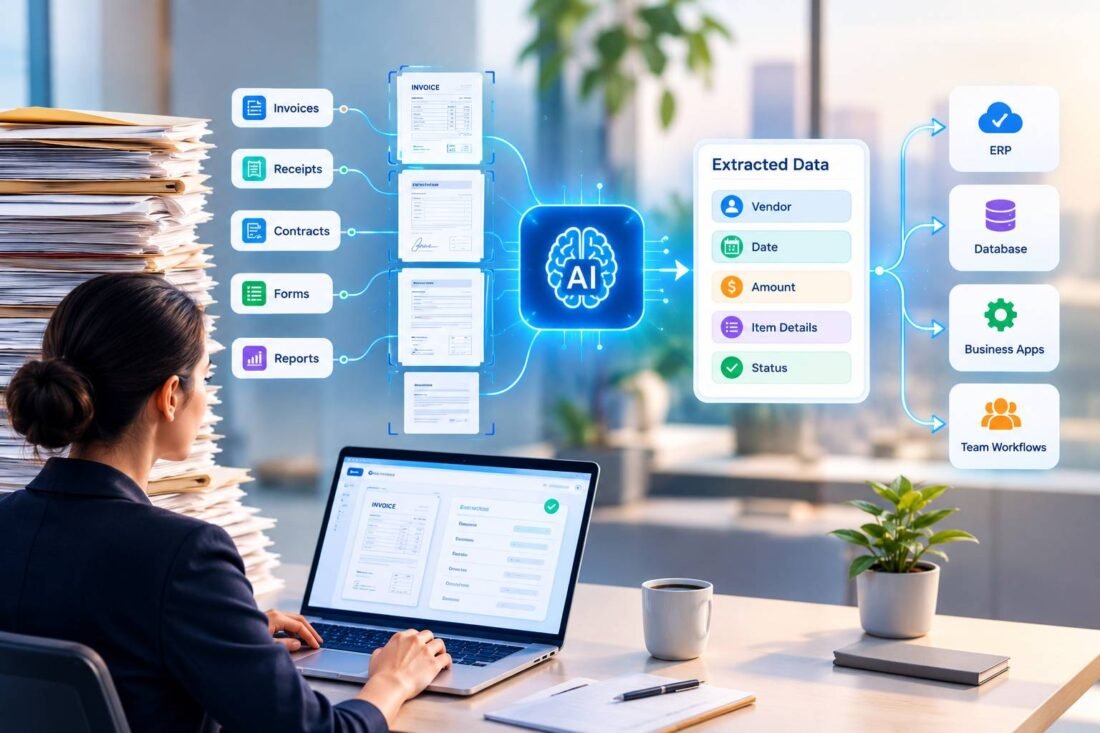
IDP goes well beyond scanning. A typical platform handles five stages:
- Capture: ingesting documents from email, portals, scanners, mobile apps, shared drives and APIs.
- Classification: identifying each document type, even within mixed bundles, using document classification AI.
- Extraction: reading printed and handwritten text, tables and key fields with OCR and NLP.
- Validation: checking extracted data against business rules, reference data and other documents, with low-confidence fields sent for human review.
- Integration: passing clean data to ERP, CRM, case management, HR or line-of-business systems, and triggering the next workflow step.
OCR and NLP Integration
OCR turns images into text. NLP understands what the text means: which date is the due date, which party is the supplier, whether a letter is a complaint or a change of address. Combining the two is what makes processing intelligent, especially for unstructured documents such as letters, emails and contracts.
Unstructured Data Processing: The Hardest Part
Forms with fixed fields are the easiest documents to automate. Invoices vary more, but follow familiar patterns. The real challenge lies in unstructured documents: letters, emails, reports and contracts where the information you need could appear anywhere, in any wording.
This is where modern NLP and large language models make the biggest difference, identifying intent, extracting facts from free text and summarising long documents for caseworkers. Enterprises that tackle structured documents first often find the greatest remaining value in this unstructured layer.
Where IDP Delivers Value Across the Enterprise
| Function | Typical documents | Automation opportunity |
|---|---|---|
| Finance and procurement | Invoices, purchase orders, receipts, statements | Accounts payable, expense processing, reconciliations |
| Customer operations | Application forms, ID documents, correspondence | Onboarding, changes of details, complaints routing |
| Insurance | Claim forms, estimates, medical reports, photos | Claims intake and triage |
| HR | CVs, right to work documents, contracts, timesheets | Recruitment, onboarding, payroll inputs |
| Legal and compliance | Contracts, policies, regulatory notices | Clause extraction, obligation tracking |
| Logistics and supply chain | Delivery notes, bills of lading, customs forms | Goods-in reconciliation, customs processing |
| Public sector | Paper forms, applications, planning documents | Citizen service processing and case management |
IDP, RPA and Enterprise Workflow Automation
Robotic process automation (RPA) mimics user actions to move data between systems, but it needs structured inputs. IDP provides those inputs by turning documents into data. Together, RPA and IDP enable end-to-end business process automation: a document arrives, IDP extracts and validates the data, and RPA or workflow software updates systems, sends notifications and routes exceptions.
Where modern APIs exist, direct integration is usually more robust than RPA. Many enterprises combine both, using APIs where they can and RPA for legacy systems without them. Increasingly, AI agents orchestrate these steps, deciding what to do with each document based on its content.
Real Business Example: HMRC’s Form Processing
- The challenge. HM Revenue and Customs receives large volumes of handwritten and paper-based tax forms, often from citizens who are unable or reluctant to use digital channels, including people claiming work-related expenses, authorising representatives or requesting repayments. Processing was largely manual, slow and error-prone, delaying money owed to citizens and adding pressure on staff.
- The solution. HMRC worked with Hyperscience, an intelligent document processing platform, using machine learning models trained on HMRC’s own forms to extract structured data from handwritten documents.
- Implementation. Only low-confidence fields are flagged for human review, keeping people in the loop where they add most value. The platform was integrated with existing infrastructure, including scanning services and NICE automation software, creating an end-to-end workflow from paper form to processed case.
- Business outcome. According to Hyperscience, processing times fell from up to 45 days to one day or less in many cases, and manual effort dropped from over an hour per document to under a minute. These are vendor-reported figures, but they illustrate the scale of improvement possible when handwritten, paper-heavy processes are automated with human review of exceptions.
The lessons apply to any large organisation: train models on your real documents, focus human effort on uncertain fields and integrate extraction into the full workflow rather than stopping at data capture. For more on HMRC’s services and digital programmes, see HMRC on GOV.UK.
Choosing an IDP Solution
| Option | Best for | Considerations |
|---|---|---|
| Cloud document AI services | Common document types, developer-led teams | Strong prebuilt models; you build workflow and review screens |
| Specialist IDP platforms | High-volume, multi-document operations | Rich features and workflows; licence costs and vendor dependence |
| Intelligent automation platforms with IDP modules | Organisations already using RPA | Good integration with existing bots; capability varies |
| Custom IDP development | Unusual documents, complex integration, strict data requirements | Full control and ownership; needs skilled delivery |
Evaluation questions to ask:
- How accurate is extraction on our documents, including poor-quality and handwritten examples?
- How easily can we add new document types?
- What does the human review experience look like?
- How does it integrate with our ERP, CRM and case management systems?
- Where is data processed and stored, and how long is it retained?
- How is pricing structured as volumes grow?
IIH Global’s natural language processing services deliver custom and hybrid IDP solutions where standard platforms fall short.
Enterprise Governance for Document Automation
Scaling IDP across departments requires consistent governance:
- Central platform, federated delivery. Share infrastructure and standards while business units own their processes.
- Data protection. Documents often contain personal and special category data. Apply UK GDPR principles, retention policies and access controls.
- Audit trails. Keep original documents, extracted values, confidence scores and reviewer changes for accountability.
- Accuracy monitoring. Track field-level accuracy and straight-through rates by document type.
- Change control. Test model updates before release, particularly in regulated processes.
Common Mistakes to Avoid
- Automating a broken process. Simplify and standardise the process before adding IDP.
- Chasing 100% automation. Design efficient human review for exceptions instead.
- Testing on clean samples only. Real documents are messier. Test on representative volumes.
- Ignoring upstream fixes. Where possible, move customers and suppliers to digital forms or structured e-invoicing, reducing the need for extraction.
- Underestimating integration. Extraction is only valuable when data reaches the systems that use it.
Implementation Roadmap
- Map document-heavy processes by volume, handling time, error cost and strategic importance.
- Select one or two pilot processes with clear baselines.
- Collect representative samples, including difficult documents.
- Configure or train extraction models and define validation rules.
- Design review and exception workflows with the teams who will use them.
- Integrate with target systems and test end to end.
- Pilot, measure and refine before expanding to further processes.
Our AI integration services connect IDP outputs with enterprise platforms so automation delivers results across the whole workflow.
Building the Business Case
A simple model helps secure investment. Consider a shared services team processing 20,000 supplier invoices a month, with each invoice taking around six minutes to key and check. That is about 2,000 hours a month. If IDP processes 60% of invoices straight through and cuts handling time on the rest to two minutes, monthly effort falls to around 270 hours, releasing more than 1,700 hours for higher-value work.
Add the value of fewer payment errors, earlier payment discounts, faster month-end close and better supplier relationships, then subtract platform, implementation, integration and ongoing review costs. Model three years, not one, because accuracy and straight-through rates usually improve after launch as models learn from corrections.
The strongest business cases combine hard savings with service improvements that matter to customers, citizens or suppliers, such as faster decisions, fewer chasers and more predictable turnaround times. They also recognise that people released from keying work can be redeployed to exception handling, supplier queries and analysis, which often improves job satisfaction as well as efficiency.
Measuring Success
- Straight-through processing rate: documents processed without human touch
- Field-level accuracy: especially for critical fields
- Cycle time: from document receipt to completed action
- Cost per document: including review effort and platform costs
- Backlog and service levels: impact on customers and citizens
- Staff time redeployed to higher-value work
The Future of AI Document Automation
Multimodal language models are making IDP more flexible, handling new document types with far less training. AI agents will increasingly manage entire document-driven processes, chasing missing information and resolving simple exceptions. At the same time, e-invoicing, digital identity and structured data exchange will reduce paper over time. For the foreseeable future, though, enterprises will continue to receive large volumes of unstructured documents, and intelligent processing will remain essential.
Conclusion
Intelligent document processing for enterprises turns unstructured documents into reliable data that flows directly into business systems, cutting cycle times, costs and errors across finance, operations, HR, legal and customer service. HMRC’s experience shows how dramatic the gains can be when extraction, human review and integration are designed together.
To plan an enterprise IDP programme, contact IIH Global.
Published by BlowupCloud.
Frequently Asked Questions
What is intelligent document processing?
IDP uses OCR, NLP and machine learning to classify documents, extract and validate data, and pass it into business systems, automating document-heavy workflows.
How is IDP different from OCR?
OCR converts images into text. IDP adds classification, understanding, validation, human review and integration, producing structured data ready for enterprise processes.
Can IDP read handwritten documents?
Yes. Modern IDP platforms handle handwriting, especially when models are trained on your specific forms, with low-confidence fields routed to human reviewers.
How do RPA and IDP work together?
IDP turns documents into structured data, and RPA or workflow tools use that data to update systems and trigger actions, enabling end-to-end automation.
What processes are best suited to IDP?
High-volume, repetitive document processes such as invoices, applications, claims, onboarding, HR paperwork and customer correspondence usually deliver the fastest returns.